Autoscaling MirageOS unikernels in Mollymawk
2026-07-28In our quest to build robust opensource tools that let users deploy their own infrastructure, we have recently tackled one of the most critical features for any modern hosting environment: Autoscaling.
It is now possible to automatically scale MirageOS unikernels up and down in response to real-time metrics, such as CPU load. In this article, we'll explore a little what that looks like in mollymawk.
1. Zero-Agent Metrics Collection via Albatross
Traditional autoscalers require running a heavy telemetry agent (like telegraf or prometheus-exporter) inside the guest OS. In a MirageOS unikernel, we want to keep the guest image as minimal, secure, and fast as possible.
The autoscaling process starts with Albatross, which collects resource usage metrics (e.g rusage counters, CPU time, and throughput counters from the virtual network devices assigned to the unikernel) directly from the host system for each running unikernel. Albatross then provides a continous stream of statistics which clients can subscribe to. Mollymawk is one of such clients. Mollymawk performs calculations (such as CPU load) from these statistics and keeps track of the data in-memory for each unikernel (and its clones).
Once these statistics arrive mollymawk, it calculates the cpu load of the unikernel to determine if to scale up, scale down or leave it be. Before mollymawk can act on the unikernel, the user has to setup a scaling policy for the unikernel. In this way, users have full control of how their infrastructure is handled.
2. Configuring Scaling Policies
Autoscaling behaviour is configured on a per-unikernel basis using Scaling Policies.
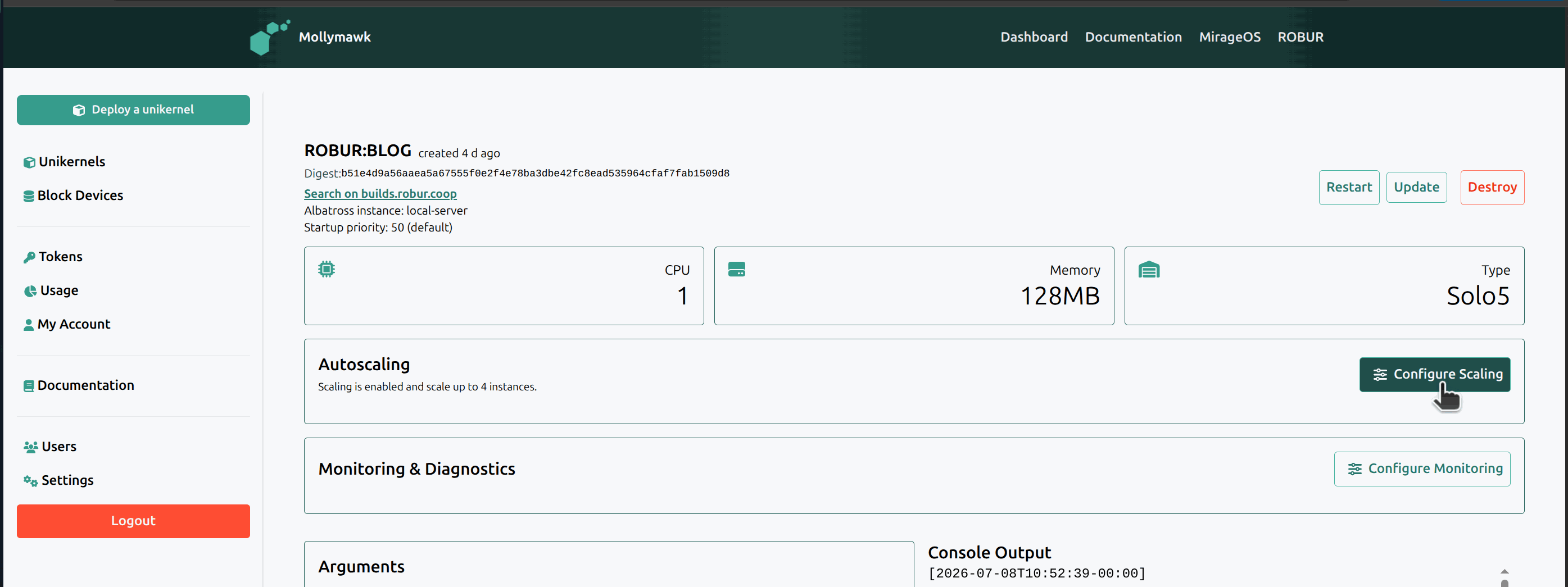
In mollymawk, users can configure:
- if the unikernel should scale; and if yes;
- the maximum allowed clones mollymawk can create.
All unikernels (which are not clones) have a minimum instance of 1, unless the user explicitly destroys the unikernel themselves.

In the future, we plan to extend these policies to allow users to customize their scaling triggers rather than relying on fixed defaults:
- Configurable CPU Thresholds: Allowing users to set custom CPU percentage limits for scaling up or down (e.g., triggering a scale-up at 80% load instead of 90%), as well as adjusting the consecutive check window.
- Network Thresholds (Throughput & Bandwidth): Scaling based on network traffic volume (bytes/sec).
- Multi-Metric Triggers: Combining CPU, network, and resource metrics so that a scale-up action is triggered whenever any monitored threshold is exceeded.
Note: scaling policies are directly related to the users usage policy. if a users usage policy allocates them 15 unikernels in total, then they cannot configure a policy which allows any unikernel to scale more than 15 instances.
3. The Cluster Manager
At the heart of the system is the Cluster manager. The manager organizes unikernels into Groups consisting of:
- A Primary unikernel: the main instance which has the scaling policy.
- Zero or more Clones: spawned on-demand, following the naming scheme
<primary-name>-clone-<id>.
The manager evaluates the group's health as follows:
- It calculates the average CPU usage across all active instances (primary + clones) in the group.
- If the average CPU load exceeds 90% for a number of consecutive checks (currently 3), then a scale-up action is triggered and a new clone is deployed. We use consecutive checks so that mollymawk doesn't execute scaling decisions based on isolated spikes.
- If the average CPU load falls below 40% for a number of consecutive checks (5), then a scale-down action is triggered and one of the clones is destroyed.
- Ghost Clones: When Mollymawk restarts, its in-memory tracking is lost. To handle this, when statistics arrive for clones that already exist in Albatross but are missing in Mollymawk's cluster manager, the manager dynamically registers them on-the-fly ("ghost clone" tracking) so they immediately participate in scaling decisions.
4. Scaling operations
For the purpose of this article, we use the HTTP benchmarking tool called wrk to increase the cpu load of our test unikernel.
Usage: wrk <options> <url>
  Options:
    -c, --connections <N>  Connections to keep open
    -d, --duration    <T>  Duration of test
    -t, --threads     <N>  Number of threads to use
    [truncated]
With this tool, we can for instance stress the url http://10.0.0.x with the command:
wrk -c400 -d300s -t4 http://10.0.0.x
We have deployed a unipi unikernel called blog. Unipi is a MirageOS unikernel that provides the contents of a git repository via HTTP and HTTPS.
We use DNSvizor for dynamic IP registrations. DNSvizor is a unikernel which listens for DNS requests and DHCP requests in a local network.
For this test, we have deployed DNSvizor (with IP 10.0.0.6) and the domain name .service, so any unikernel which requests for a DHCP lease will get the hostname: <unikernel-name>.service.
We use dig which is a DNS lookup utility to query DNSvizor for IP addresses. Doing this for our unikernel blog, which will have as hostname blog.service:
$ dig blog.service @10.0.0.6

; <<>> DiG 9.20.11-1ubuntu2.4-Ubuntu <<>> blog.service @10.0.0.6
;; global options: +cmd
;; Got answer:
;; ->>HEADER<<- opcode: QUERY, status: NOERROR, id: 36452
;; flags: qr aa; QUERY: 1, ANSWER: 1, AUTHORITY: 0, ADDITIONAL: 0

;; QUESTION SECTION:
;blog.service.			IN	A

;; ANSWER SECTION:
blog.service.		3600	IN	A	10.0.0.148

;; Query time: 0 msec
;; SERVER: 10.0.0.6#53(10.0.0.6) (UDP)
;; WHEN: Wed Jul 08 12:01:58 WAT 2026
;; MSG SIZE  rcvd: 62
Awesome. Our blog unikernel is running and can be accessed via http://10.0.0.148.
We can now proceed to understand the different scaling operations.
4.1. How Scaling Up Works
Let us consider our primary unikernel called blog. On start, the blog group will contain just the blog unikernel with 0 clones.
Using the wrk tool, we introduce some traffic to the unikernel:
wrk -c400 -d300s -t4 http://10.0.0.148
Because wrk creates 400 concurrent TCP connections across 4 threads sending non-stop HTTP GET requests in a tight loop, the CPU core assigned to the unikernel spends its execution time parsing packets which affects its load.
This immediately starts spiking the unikernels CPU load and we can see it reflect in mollymawk's logs:
...[truncated]
2026-07-08T11:03:05-00:00: [INFO] [application] Initialise an HTTP server (no HTTPS) on port 8080
2026-07-08T11:16:25-00:00: [INFO] [autoscaling] robur/blog: high usage (100%), [ticks: 1/3]
2026-07-08T11:16:35-00:00: [INFO] [autoscaling] robur/blog: high usage (100%), [ticks: 2/3]
2026-07-08T11:16:45-00:00: [INFO] [autoscaling] robur/blog: overloaded (100%), spawning new clone: blog-clone-2
2026-07-08T11:16:47-00:00: [INFO] [application] albatross-force-create: successfully created blog-clone-1 with result \"created unikernel\"
2026-07-08T11:16:55-00:00: [INFO] [autoscaling] robur/blog: cooldown (usage: 100%)
2026-07-08T11:17:05-00:00: [INFO] [autoscaling] robur/blog: cooldown (usage: 100%)
2026-07-08T11:17:15-00:00: [INFO] [autoscaling] robur/blog: cooldown (usage: 100%)
2026-07-08T11:17:25-00:00: [INFO] [autoscaling] robur/blog: cooldown (usage: 100%)
2026-07-08T11:17:35-00:00: [INFO] [autoscaling] robur/blog: cooldown (usage: 100%)
2026-07-08T11:17:45-00:00: [INFO] [autoscaling] robur/blog: cooldown (usage: 100%)
2026-07-08T11:17:55-00:00: [INFO] [autoscaling] robur/blog: cooldown (usage: 100%)
2026-07-08T11:18:05-00:00: [INFO] [autoscaling] robur/blog: cooldown (usage: 0%)
On the dashboard, we can see the new clone listed:
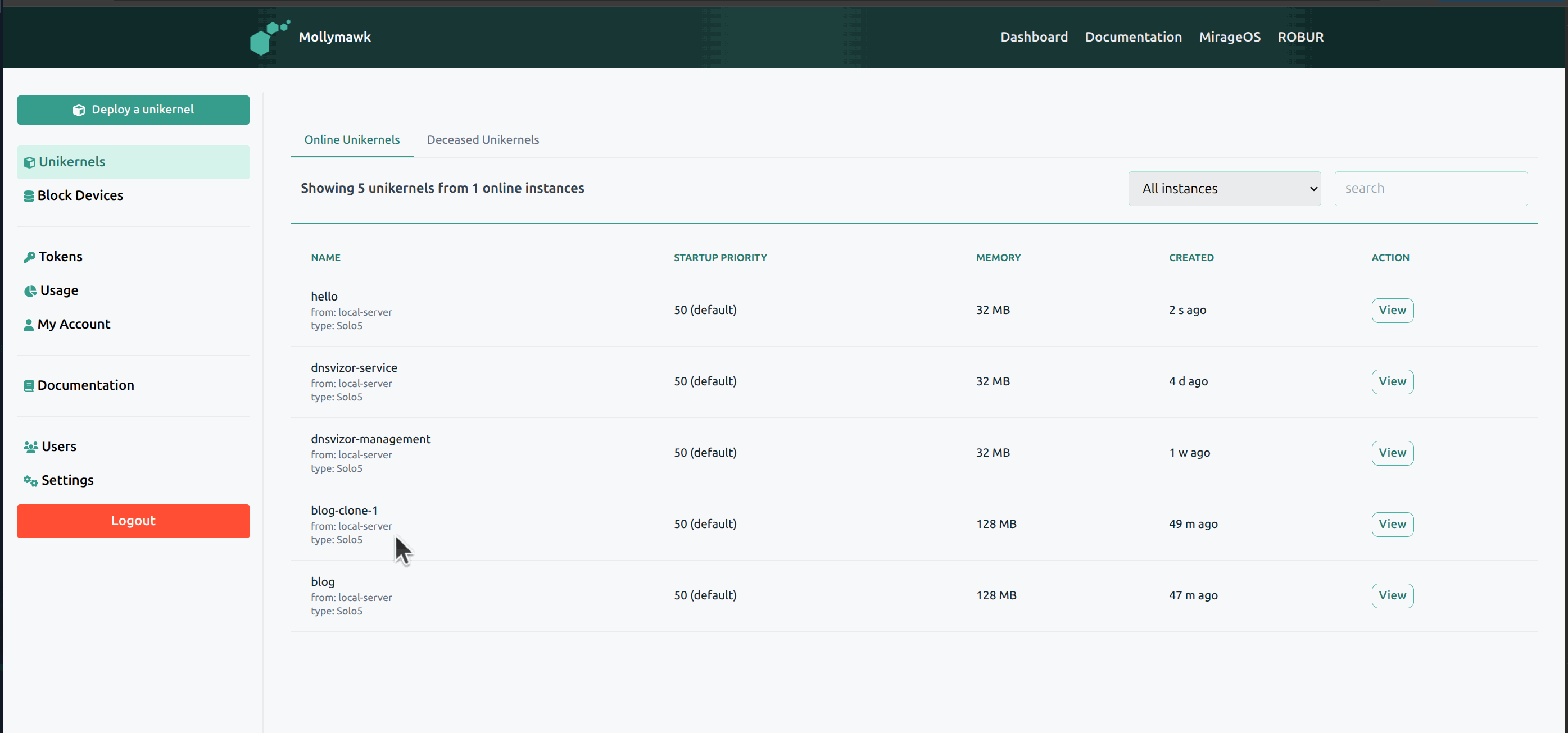
In the future we plan to update the UI so clones are listed on the dashboard of the primary unikernel and not as primary instances themselves.
If we consult dig to give us all the IP's registered to blog.service, we will observe two IP addreses: the initial IP of blog and the new IP of blog-clone-1.
$ dig blog.service @10.0.0.6

; <<>> DiG 9.20.11-1ubuntu2.4-Ubuntu <<>> blog.service @10.0.0.6
;; global options: +cmd
;; Got answer:
;; ->>HEADER<<- opcode: QUERY, status: NOERROR, id: 12973
;; flags: qr aa; QUERY: 1, ANSWER: 2, AUTHORITY: 0, ADDITIONAL: 0

;; QUESTION SECTION:
;blog.service.			IN	A

;; ANSWER SECTION:
blog.service.		3600	IN	A	10.0.0.148
blog.service.		3600	IN	A	10.0.0.174

;; Query time: 1 msec
;; SERVER: 10.0.0.6#53(10.0.0.6) (UDP)
;; WHEN: Wed Jul 08 12:44:14 WAT 2026
;; MSG SIZE  rcvd: 78
The sequence of actions When the blog group is flagged as Overloaded can be summarised as:
- Retrieve Binary: mollymawk queries albatross for the primary unikernel's binary. This ensures that autoscaling works for both unikernels deployed from our reproducible builds infrastructure Robur builds as well as for unikernels manually uploaded during deployment.
- CPU Pinning: mollymawk then checks the least used CPU core to deploy the new clone on. (
blogis deployed on cpuid 1 whileblog-clone-1is deployed on cpuid 2). - Sanitize Arguments: mollymawk then cleans up, if it exist, the
--name=..argument, which will be inserted by albatross using the clone's name. The reason to remove this is such that other metrics clients, such as reporting to influxDB and grafana don't have colliding metrics being reported from two different vms but under the same name. - Launch Clone: Mollymawk then sends a command to albatross to deploy the new clone (in this case.,
blog-clone-1).
Note:
** Unikernels with Block Devices:** Because Mirage block devices cannot be shared by multiple running VMs safely, any unikernels which have any block device(s) cannot be scaled even if they have a scaling policy.
4.2 Load balancing
Since we strip out the --name arg, this means the DHCP lease request of the clone will be done in the name of the clone, which leads to a situation where we have multiple hostnames. To solve this, we made a change to DNSvizor (in this PR and and this PR) which is able to recognize a DHCP request from a clone and register it correctly to the primary hostname (for our test, blog.service instead of blog-clone-1.service). With this, when clients requests for blog.service, DNSvizor returns a list of all IP addresses registered to the hostname. Standard behavior (per RFC 6724) is for the client application to attempt a connection to the first IP address in the returned list. Since DNSvizor returns a different order of the IP addresses each time it gives the list, this leads to a load-balancing method known as the DNS round-robin.
Using dig in a loop, we can see the order of IP's returned for our unipi and its clone.
Query 1: 10.0.0.60  10.0.0.10
Query 2: 10.0.0.10  10.0.0.60
Query 3: 10.0.0.60  10.0.0.10
Query 4: 10.0.0.60  10.0.0.10
Query 5: 10.0.0.10  10.0.0.60
4.3. Cooling down
After scaling up or scaling down, the group enters a cooldown which prevents another scale action from happening within 600 seconds of the last scale action.
2026-07-08T11:04:05-00:00: [INFO] [autoscaling] robur/blog: cooldown (usage: 100%)
2026-07-08T11:04:15-00:00: [INFO] [autoscaling] robur/blog: cooldown (usage: 100%)
2026-07-08T11:04:25-00:00: [INFO] [autoscaling] robur/blog: cooldown (usage: 100%)
2026-07-08T11:04:35-00:00: [INFO] [autoscaling] robur/blog: cooldown (usage: 100%)
2026-07-08T11:04:45-00:00: [INFO] [autoscaling] robur/blog: cooldown (usage: 100%)
2026-07-08T11:04:55-00:00: [INFO] [autoscaling] robur/blog: cooldown (usage: 0%)
2026-07-08T11:05:15-00:00: [INFO] [autoscaling] robur/blog: cooldown (usage: 0%)
2026-07-08T11:05:25-00:00: [INFO] [autoscaling] robur/blog: cooldown (usage: 0%)
4.4. How Scaling Down Works
Now let us say the unikernel blog and it's clone blog-clone-1 are now stable and there's no longer a high usage of the cpu load;
2026-07-08T12:02:55-00:00: [INFO] [autoscaling] robur/blog: low usage (0%), [ticks: 1/5]
2026-07-08T12:03:05-00:00: [INFO] [autoscaling] robur/blog: low usage (0%), [ticks: 2/5]
2026-07-08T12:03:15-00:00: [INFO] [autoscaling] robur/blog: low usage (0%), [ticks: 3/5]
2026-07-08T12:03:25-00:00: [INFO] [autoscaling] robur/blog: low usage (0%), [ticks: 4/5]
2026-07-08T12:03:35-00:00: [INFO] [autoscaling] [robur/blog]: underloaded (0%), pruning: blog-clone-1
2026-07-08T12:03:45-00:00: [INFO] [autoscaling] robur/blog: cooldown (usage: 0%)
2026-07-08T12:03:55-00:00: [INFO] [autoscaling] robur/blog: cooldown (usage: 0%)
The sequence of steps is when CPU load is consecutively low, mollymawk then flags the group as Underloaded. For a group to be underloaded, it must have undergone the cooldown period, and then undergone a series of consecutive thicks (5). At this point, the cluster manager selects the most recently spawned clone to prune.
- Mollymawk sends a command to albatross requesting that the target clone be destroyed.(in this case.,
blog-clone-1). - Albatross immediately terminates the clone.
- Mollymawk updates its internal state, removing the clone from the groups cluster.
4.5. De-registering the IP of a clone after scaling down
To prevent clients from trying to connect to an IP that points to a non-existent unikernel, our strategy is to deploy DNSvizor with a short lease time. This way, once the unikernel is destroyed, it's IP lease expires quickly and clients can no longer connect to it.
We experimented this by deploying DNSvizor with a lease time of 15 seconds and 90 unikernels each requesting for a renewal every 7 seconds. Using grafana, we observe the memory usage and network throughput of DNSvizor to be handling the requests really well.
- Number of vms: 90
- Lease time: 15 seconds (t1 = 7s, t2 = 12s)
- Memory: DNSvizor is running with 32MB allocated.
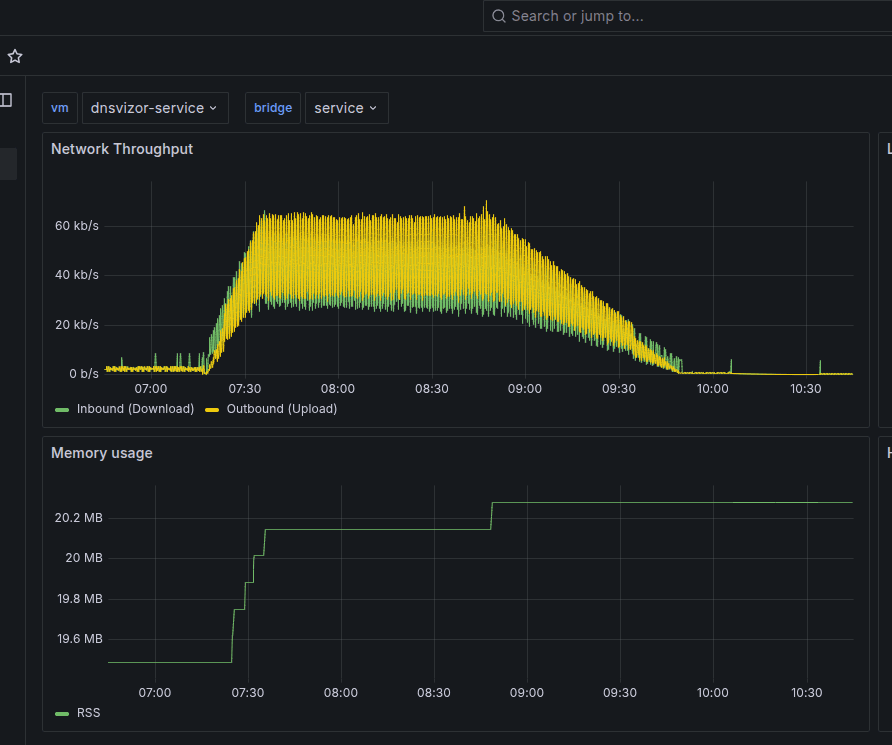
- As the unikernels deploy, we see an increase in network throughput, and each new unikernel gets assigned an IP address.
- When all the 90 unikernels are deployed, we see a steady network throughput, and each unikernel continues to renew it's IP lease with no issue.
- When we scale down all 90, the network throughput decreases as expected and all the IP's previously assigned are de-registered.
5. Conclusion
We can scale up and down unikernels based metrics received via albatross. As the unikernels scale up, they receive an IP address registered to a hostname via DNSvizor and when they scale down, this IP address is de-registered. Autoscaling is a vital part of managaging infrastructure and with Mollymawk, this is now possible to do with MirageOS unikernels.
6. Appendix
The work to achieve autoscaling was done in the following PR's accross several projects:
- Cluster manager and Autoscaling module: https://github.com/robur-coop/mollymawk/pull/250
- UI to configure scaling policies and to keep track of scaling policies: https://github.com/robur-coop/mollymawk/pull/245 and https://github.com/robur-coop/mollymawk/pull/246
- Provide metrics (CPU, memory, bandwidth) to mollymawk: https://github.com/robur-coop/mollymawk/pull/249
- Scale down unikernels: https://github.com/robur-coop/mollymawk/pull/249
- Scale up unikernels: https://github.com/robur-coop/mollymawk/pull/249
- DNSvizor can recognize DHCP lease request from mollymawk: https://git.robur.coop/robur/dnsvizor/pulls/2
- DNSvizor has a flag to enable/disable name stripping for mollymawk clones: https://git.robur.coop/robur/dnsvizor/pulls/3
- Rework of statistics functionality in albatross: https://git.robur.coop/robur/dnsvizor/pulls/3
- Enhance Lease.t with options for the lease in charrua: https://github.com/mirage/charrua/pull/156
- Renewal of the DHCP lease: https://github.com/mirage/charrua/pull/156 and https://github.com/reynir/charrua/pull/1
- Rotate/shuffle answers for DNS roundrobin: https://github.com/mirage/ocaml-dns/pull/421
- Properly remove DNS entries: https://git.robur.coop/robur/dnsvizor/pulls/5