Chaos, a simple NTP server as an unikernel for you!
2026-11-19It's now been over a year since the last MirageOS retreat,
when I found the courage to implement an NTP server in OCaml as a unikernel.
This is an idea we've been discussing regularly with @hannes. The
benefit of an NTP server in the form of a unikernel is that it enables other
unikernels to keep accurate time: we've noticed for quite some time that the
monotonic clock provided by Solo5 could drift. For unikernels such
as letsencrypt, this could lead us to request a new
certificate after the previous one had expired...
The benefit for us was being able to maintain the correct time without using what is known as the wall clock provided by Solo5 (which inevitably involves a hypercall).
I found the courage to do this, particularly as Chaos is our first unikernel to use the new workflow we recently presented. The UDP stack required to start implementing the NTP protocol was fairly straightforward to implement, and we were able to experiment with such a server fairly quickly.
NTP: where is the complexity?
My background is essentially in implementing protocols, and I'm more or less
used to reading RFCs and implementing them in OCaml. As far as NTP is
concerned, the protocol is actually quite simple. I ran several iterations to
serialise a Ptime.t value into an NTP packet with the help of
Wireshark (as a reference) during the retreat, and I was already
starting to enjoy myself.
However, for those who have actually looked at the implementation - even just that of an NTP client - the complexity lies not in the protocol itself but in the processing of the information.
The issue with NTP
The problem with NTP is that the procedure described in the RFC is outdated and problematic for a whole host of reasons. The most obvious is that the procedure assumes symmetry between the time of transmission from you to the NTP server and the time of reception from the NTP server to you, hence the division by 2: in reality, the transmission may take one route and the reception another.
This means that the information we ultimately obtain is slightly distorted: it is said that there is (network) noise which can influence the calculation and determine the true time...
Chrony as the reference
There are currently two main methods for resolving this noise problem:
- what is known as linear regression using the ordinary least squares (OLS) algorithm, implemented by the Chrony project
- a simulation of a dynamic system to which the Kalman filter is applied, implemented by the ntpd-rs project
After reading through the code & benchmarks several times, we realised that the
environment we were aiming for was closer to that of Chrony: that is why we set
about re-implementing Chrony as a unikernel! It is here that one can see that
Chrony's code is of a very high standard (a standard I also found in the Solo5
project). The difficulty lay in extracting the pure part of Chrony - which
involves maintaining a curve based on sources - and in determining how to
recognise them as valid (0o377) and how to combine them.
This is how we were able to propose a scheduler-agnostic approach (as
always) to a clock derived from the calculation and combination of information
from sources. We therefore decoupled everything relating to the actual
computation of our clock - from the way we receive and send NTP packets to how
we execute pieces of code reactively in response to certain events (we thus
built on the work we had already done with Miou, and particularly with
Miou.Computation.t). It’s somewhat similar to the model
found in utcp with its "wakers".
This also leads us to another debate concerning schedulers and the concept of time. With regard to Chaos, we must pay particular attention to how we can suspend a task for a certain duration whilst we are actually trying to calculate the time!
It is for this reason that we have iterated several times on Miou/mkernel in
order to identify an approach that is compatible with both our unikernels and
our applications when it comes to the concept of time: this is why the concept
of time is specific to Miou_unix or Mkernel but does not exist for Miou,
for the simple reason that implicitly choosing a time source (such as
caml_time_counter) at this level would cause us more
problems precisely for this type of application (an NTP server).
This was notably a point of debate with picos, where the concept was
required, in particular, to implement the [Cancel_after][cancel_after]
effect. This debate has, in particular, ruled out any
compromise with this particular scheduler, despite our
attempts.
Chaos at your service!
After a few attempts and the implementation of DNS resolution via UDP/TCP/TLS
(see mnet-dns), we were able to deploy a fully-fledged NTP server
available at osau.re:123. You can even monitor some of its metrics here:
chaos.osau.re. This website is also a unikernel that uses our
Chaos library to synchronise with our Chaos server!
But after a few months of testing - using our server as a potential reference and noting that it is consistently selected as, at the very least, a reliable source to be combined with others - we decided to take the plunge and register our service with ntppool.org!
ntppool.org is primarily a domain name that uses the Round Robin
technique to provide you with several available NTP servers depending
on your location. In this case, our server is located in France, in Paris. We
have just registered it and it has just reached a score of 10, which officially
makes it a server that *.fr.pool.ntp.org can recommend to all its (French)
users!
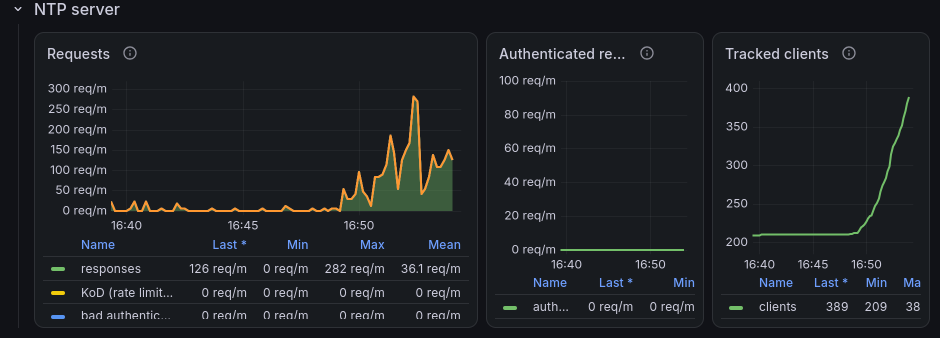
You can now check the status of our server here too.
Chaos at your home!
Of course, the aim of our co-operative is to provide unikernels that you can deploy. Furthermore, we have just added Chaos as one of our reproducible unikernels, which you can download here. We will therefore take the time to explain how to deploy it quite simply using Aussi/Docker and Albatross.
Chaos with Aussi & Docker
Using Aussi with Docker is quite straightforward. So let's take a Debian machine and install everything we need:
$ sudo apt install docker-ce docker-ce-cli containerd.io \
  docker-buildx-plugin docker-compose-plugin
$ curl -fsSL https://apt.robur.coop/gpg.pub \
  | gpg --dearmor | sudo tee /etc/apt/trusted.gpg.d/apt.robur.coop.gpg > /dev/null
$ cat <<END | sudo tee /etc/apt/sources.list.d/robur.sources
Types: deb
URIs: https://apt.robur.coop
# change this if needed
Suites: debian-13
Components: main
Signed-By: /etc/apt/trusted.gpg.d/apt.robur.coop.gpg
END
$ sudo apt update
$ sudo apt install solo5 aussi
As soon as you install aussi alongside Docker, it registers itself as an OCI
runtime named solo5. In other words, your Docker can now run
unikernels! You can check that Docker knows about it:
$ docker info --format '{{json .Runtimes}}' | grep solo5
If it is not the case (for instance if Docker was installed after aussi), the
package provides a script which adds the solo5 runtime to
/etc/docker/daemon.json (without erasing your existing configuration) and
restarts Docker:
$ sudo AUSSI_BIN=/usr/bin/aussi /usr/share/aussi/aussi-configure.sh install
Thanks to Docker's multi-stage feature, we could build our unikernel on the fly
and use the resulting artifact directly to launch our service (the
Chaos repository provides such a Dockerfile), but we're going
to save some processing time and download our unikernel directly from our
builds.robur.coop infrastructure.
We only need two files. The first one, solo5.json, describes how aussi
should launch the unikernel: how much memory it needs, which network interfaces
it uses and which arguments it expects.
Chaos expects two network interfaces: service, which is used to talk to NTP
sources and to answer to clients, and metrics, which is used to report
metrics to a Telegraf server. The service interface is bound to
the network that Docker gives to the container (eth0), and the
%{solo5.net.service.ip} and %{solo5.net.service.gw} placeholders are
replaced by the IP address and the gateway that Docker allocates to it. As for
the metrics interface, as long as the --metrics option is not given, Chaos
does not use it: a simple tap interface (which aussi creates for us) is
enough:
{
  "version": 1,
  "type": "solo5.config",
  "mem": 64,
  "nets": {
    "service": { "type": "docker", "iface": "eth0" },
    "metrics": { "type": "tap", "tap": "tap0" }
  },
  "argv": [
    "--ipv4=%{solo5.net.service.ip}",
    "--ipv4-gateway=%{solo5.net.service.gw}",
    "--server=0.fr.pool.ntp.org",
    "--server=1.fr.pool.ntp.org",
    "--server=osau.re",
    "--color=always"
  ]
}
The --server option can be repeated: Chaos will query all of these sources
(and, if a name resolves to several IP addresses, all of them), and select and
combine the best ones. Feel free to choose servers which are close to you!
The second file is the Dockerfile. Since a unikernel does not need any
operating system around it, our image starts from scratch and only contains
the unikernel and its configuration:
FROM scratch
ADD --chmod=755 https://builds.robur.coop/job/mchaos/build/latest/f/bin/chaos.hvt /chaos.hvt
COPY solo5.json /solo5.json
ENTRYPOINT ["/chaos.hvt"]
We can now build our image and launch our NTP server. Be careful, port 123 must
be free on your host: an NTP daemon (such as ntpd, chrony or
systemd-timesyncd) may already be listening on it (so you should stop such
service).
$ ls
Dockerfile  solo5.json
$ docker build -t chaos .
$ docker run -d --name chaos --runtime=solo5 -p 123:123/udp chaos
$ docker logs -f chaos
            |      ___|
  __|  _ \  |  _ \ __ \
\__ \ (   | | (   |  ) |
____/\___/ _|\___/____/
Solo5: Bindings version v0.11.0
...
After letting it warm up for a little while (Chaos needs several samples from its sources before it considers itself synchronised), you can ask it the time:
$ sntp localhost
Chaos with Albatross
Using Albatross to deploy unikernels involves a few more steps (as we aim to be
clear about what is happening on your server). We therefore recommend that you
follow the instructions for installing and setting up Albatross from
our tutorial. Once you’ve finished, you should have a
cacert.pem file and a ca.{key,pem} file, which correspond to your
credentials for communicating with Albatross via albatross-tls-endpoint.
Contrary to Docker, Albatross does not allocate IP addresses for you: it simply
attaches the unikernel to an existing bridge. So let's create one, named
service, on which our unikernel will have the address 10.0.0.2 and our host
the address 10.0.0.1:
$ sudo ip link add name service type bridge
$ sudo ip addr add 10.0.0.1/24 dev service
$ sudo ip link set service up
Chaos also expects a second interface, metrics, to report its metrics to a
Telegraf server. It is only used if the --metrics option is given,
but the interface must exist anyway. So let's create a second bridge, metrics,
which is where your Telegraf server could live:
$ sudo ip link add name metrics type bridge
$ sudo ip addr add 10.0.1.1/24 dev metrics
$ sudo ip link set metrics up
We've also put together a short tutorial explaining how to monitor unikernels using Telegraf; it’s available here.
You can then download our unikernel and deploy it. The --net=service:service
and --net=metrics:metrics arguments tell Albatross to attach the service
and metrics network interfaces expected by Chaos to our bridges of the same
name, and each --arg is given as is to the unikernel:
$ curl -fLo chaos.hvt https://builds.robur.coop/job/mchaos/build/latest/f/bin/chaos.hvt
$ albatross-client create chaos chaos.hvt \
  --destination=<REMOTE_IP:PORT> \
  --ca=ca.pem --ca-key=ca.key --server-ca=cacert.pem \
  --mem=64 --restart-on-fail \
  --net=service:service --net=metrics:metrics \
  --arg="--ipv4=10.0.0.2/24" \
  --arg="--ipv4-gateway=10.0.0.1" \
  --arg="--server=0.fr.pool.ntp.org" \
  --arg="--server=1.fr.pool.ntp.org" \
  --arg="--server=osau.re"
$ albatross-client console chaos \
  --destination=<REMOTE_IP:PORT> \
  --ca=ca.pem --ca-key=ca.key --server-ca=cacert.pem
All it takes then is a few iptables rules to allow connections between the
unikernel and the Internet (we assume that your server is connected to the
Internet via eth0). The unikernel must be able to reach its NTP sources and
DNS resolvers, and incoming NTP requests on port 123 must be redirected to it:
$ sudo sysctl -w net.ipv4.ip_forward=1
$ sudo iptables -t nat -A POSTROUTING -s 10.0.0.0/24 -o eth0 -j MASQUERADE
$ sudo iptables -A FORWARD -i service -o eth0 -j ACCEPT
$ sudo iptables -A FORWARD -i eth0 -o service \
  -m state --state RELATED,ESTABLISHED -j ACCEPT
$ sudo iptables -t nat -A PREROUTING -i eth0 -p udp --dport 123 \
  -j DNAT --to-destination 10.0.0.2:123
$ sudo iptables -A FORWARD -i eth0 -o service -p udp -d 10.0.0.2 \
  --dport 123 -j ACCEPT
If your unikernel is behind a NAT (as it is the case here) and you plan to
register it in a pool such as ntppool.org, you should also give it its public
IP address with --arg="--public-ipv4=<PUBLIC_IP>": this way, Chaos ignores
replies which come from itself (if the pool happens to recommend your own
server to it) and avoids synchronising with itself!
Finally, Albatross can also keep your unikernel up to date: as soon as a new
version of Chaos is built by builds.robur.coop, a simple
albatross-client update chaos (with the same --destination and credentials)
fetches it and restarts the unikernel with the same arguments.
Conclusion
Chaos is still at the experimental stage. Indeed, an NTP server is a source that must be taken seriously, and although we are becoming increasingly confident in its use, we know that several features are still missing (including TLS, amongst others).
However, registering our service with a pool such as ntppool.org is a major milestone. We carefully monitor our unikernels every day in order to continue improving our libraries (my first thing to do in the morning is to open my Grafana dashboard to check that everything is running smoothly!).
Our co-operative may well be the only one developing and using unikernels, and that is what defines the quality of the various services we offer. In short, please do not hesitate to contact us if you'd like to use any of our services (ranging from NTP to domain names and, of course, email!).